1. Open Internet Explorer.
2. Press Alt + T + O to open Internet Options dialog box.
You may also click
 or
or  and then click Internet Options.
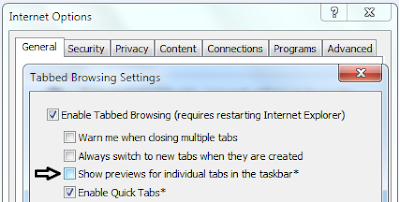
3. Click General tab. In the Tabs section, click Settings button to open Tabbed Browsing Settings dialog box.
 4. Do one of the following:
To enable tabbed browsing : Click to place the checkmark beside Enable Tabbed Browsing (requires restarting Internet Explorer).
To disable tabbed browsing : Click to remove the checkmark beside Enable Tabbed Browsing (requires restarting Internet Explorer).
5. Click OK to close Tabbed Browsing Settings dialog box.
6. Click OK again to close Internet Options dialog box.
7. Restart Internet Explorer for the changes to take effect.
 To move the Stop and Refresh buttons before Address bar, perform the following:



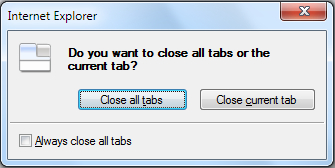 If Tabbed Browsing is enabled in Internet Explorer 8 and when you close an Internet Explorer window that has multiple tabs, a message box appears as shown in the figure to the right.